 Password Recovery
 How to unlock the password when Excel forgets it? Xls password cracking, xlsx password removal
2024-04-25 19:03:50

Excel is often used in our daily work or study. We send Excel to other people over the Internet, but sometimes, in order to protect the company's data or protect privacy, and prevent others from modifying or copying the data at will, the usual way is to add a password to the Excel sheet. After a long time, sometimes I forget the password, how to solve it? Let's take a look at how to solve it.
Yesterday I suddenly received a request for help from a friend. I don't know where he got the Excel file, and he wants to copy the data in it, when he clicks on the Edit Excel sheet page, it prompts: The cell or chart you are trying to change is in a protected worksheet. To make changes, unprotect the worksheet, and you may need to enter a password. As shown in the figure below:

Protected prompts
Oh roar! It's an encrypted sheet. I want to use the data in this sheet, but I can't copy it. If you knock it by hand, it can be done. But there is a lot of data in the sheet page. If you knock it by hand, it's a bit of a hassle. It would be nice if we could remove this protection and copy it directly.
Brother Kai really hasn't studied Excel before, which protects sheet pages. This just piqued Kai Ge's curiosity. Let's just study how to get it done.
After a period of online searching, not to mention, Brother Kai found a solution. Try decisively:
1. Rename the Excel file and modify the file suffix
Rename the Excel file that you forgot your password (this is to prevent the original file from being overwritten after later operations), and change the new Excel file suffix from the original xlsx to rar after the renaming. As shown in the figure below:

Modify the file suffix
2. Open the RAR file and find the corresponding SHEET file
Double-click the RAR archive file that you just renamed, and find and open the XL folder:
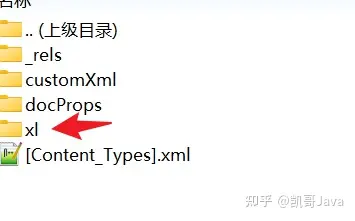
Locate the XL folder
When you open the XL directory, you will find that there are many files and folders inside. We just need to open the worksheets folder. As shown below:
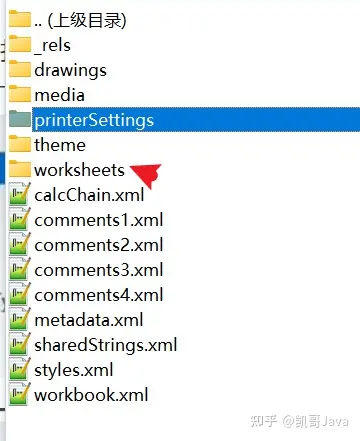
Find Worksheets
The worksheets folder contains our sheet data. After opening it, you can see that multiple sheets in the Excel file exist in the form of xml. As shown below:
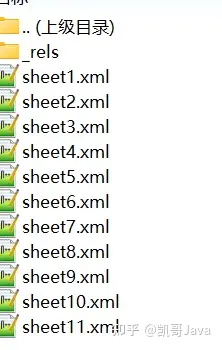
找到你需要修改的sheet
3. Delete the encrypted information
Find the sheet we need to open, for example, Brother Kai here is the fourth sheet page. So that is, open sheet4.xml file. You can open it directly with Notepad. It can also be opened in another text editor of your choice.
After opening the editor that Kaige likes, search for the keyword Protection. Once you've found it, delete it. Note that the <sheetProtection /> requires a closing symbol. Once you've deleted the text, click Ctrl+S to save it.

Modification will xlsx
4、重新修改后綴未xlsx
After saving, close the document. Change the rar suffix of the archive to xlsx. and open the Excel file. Just look for the sheet page that needs to be copied.