 Password Recovery
 Hashcat tutorial on cracking mode parameter settings
2024-12-24 20:05:32
1. Combination mode (-a 1)
Sometimes, we will encounter such a problem, for example, the password is abcdabcd mode, and we do not have abcdabcd in the dictionary, if we go to generate, it will take up a huge space, can there be a way to generate abcdabcd through abcd? In hashcat, of course, it is possible, and in this section we will first talk about this pattern, which is the dictionary combination attack pattern (parameter denoted as -a 1).
1. The combination mode of the same dictionary
First, let's describe the meaning of -a 1 with a simple example, and then take you step by step to the complex application of the pattern.
hashcat –a 1 –m 0 mima.txt –o outfile dic.txt dic.txt

The meaning of this command is to use the dictionary of dic.txt and combine it to decipher the mima.txt, if the dic.txt is a dictionary as shown in the figure below

Then the new dictionary for deciphering the mima.txt formed by the combination of the commands is:
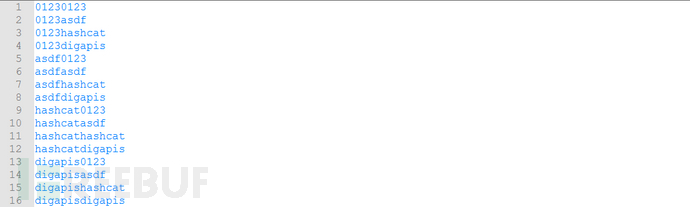
That is, each line in the dic.txt is combined with itself to form a new dictionary.
2. The combination mode of different dictionaries
The previous description is the combination of the same dictionary, if it is a different dictionary, hashcat is also supported, using the following command

It means that all the rows in the dic1.txt are combined with all the rows in the dic2.txt to form a dictionary that solves the mima.txt.
When is the combination mode used? In general, the combination mode is clearly divided into two segments, such as: abcd1234, asdfasdf, aaa19770101、...... In other cases, the password is clearly manifested in the previous paragraph and the next paragraph.
3. What needs to be paid attention to
(1) In combination mode, hashcat can only support the combination of two dictionaries (or the same dictionary twice), and cannot support multiple dictionaries (more than 3 dictionaries) or the same dictionary more than 3 times of combination attacks.
That is, the following command is wrong:
hashcat –a 1 –m 0 mima.txt –ooutfile dic.txt dic.txt
hashcat –a 1 –m 0 mima.txt –ooutfile dic1.txt dic2.txt dic3.txt
(2) In combination mode, the directory is not supported (in the previous article, the entire directory is supported in the -a 0 mode), which means that the following two situations are also not possible.
hashcat –a 1 –m 0 mima.txt –ooutfile /dic/
hashcat –a 1 –m 0 mima.txt –ooutfile /dic/*.txt
(3) Timeliness
When using the combination mode, if the dictionary is large, for example, two dictionaries are 10,000,000, the combined space is 100,000,000,000,000,000, which is equivalent to the attack of 10,000,000 dictionaries (each dictionary has 10,000,000 entries), then the space is too large, and there may be a lot of repetition, although the coverage increases, but the timeliness is not high.
2. Brute-force attack mode (-a 3)
Brute-force hacking, as the name suggests, is to violently exhaust the specified plaintext space, which is a way to do it (because you can't narrow the exhaustion space).
Before we get into brute force, let's talk about exhausting space. Take the common lowercase letters + numbers as an example, if the password length is 4, its space is 36**4=1679616, which seems to be not big, and it will come out in a while; If the length of the password is 8, then its space is 36**8=2821109907456, and if the solution time is 1000,000,000 (1 billion times/s), the solution time is about 2820 seconds, about 47 minutes, which seems to be bearable; If the length of the password is 10, its space is 36**10=3656158440062976, and if the solution time is 1000,000,000 (1 billion times/s), the solution time exceeds 1000 hours, then there is no way to accept it.
There are many different types of brute-force attack modes (parameter denoted as -a 3) in hashcat, and we will talk about them one by one below.
1. Simple mode
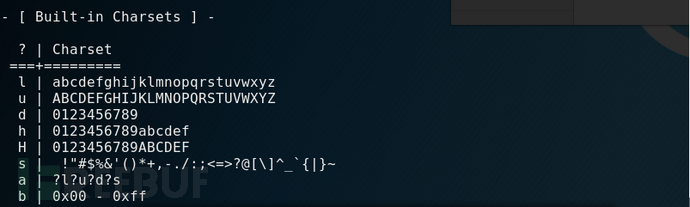
There are 8 default character sets built into Hashcat, which are l (26 lowercase letters), u (26 uppercase letters), d (10 numbers), h (lowercase hexadecimal characters), H (uppercase hexadecimal characters), s (special characters 31), a (l, u, d, s collection of 95 full characters) and b (binary 0x00-0xFF). This is shown in the figure below
 Example
(1) If the lowercase 6-bit space is exhausted, use the following command:
 (2) If the 8-bit space of all characters is exhausted, use the following command:
 (3) If the all-digital space with a range of 4-6 bits is exhausted, the command is as follows:
 Here, a parameter --inrcement --increment-min 4 --inrcement --increment-max 6 is added to indicate the minimum and maximum values of the exhaustion length.
2. Combination mode
The combinatorial pattern here is an organizational pattern in exhaustive mode, not a (-a 1) pattern.
Let's take a quick example:
(1) If a password is exhausted and the length of the password is estimated to be 6, the first digit is the full character set, the second digit is lowercase letters, the third digit is uppercase letters, and the fourth, fifth, and sixth digits are the full character set, then the command can use the following mode:
 (2) The following are several combination modes,
1: If a password has a range of case + digits and a length of 6, the command is as follows:
 Here -1 ?l?u?d is used to represent uppercase and lowercase letters + numbers.
2: If the exhaustion range is 6 digits, the first and fourth digits are uppercase + numbers, the second digits are uppercase and lowercase, the third and fifth digits are uppercase + digits, and the sixth digit is a number, then the command is as follows:
 Of course, you can also specify the minimum and maximum lengths, as shown in the following image

3. Custom mode
Earlier, we introduced that hashcat has 8 built-in character sets, but what if the character set you need is not within these 8 types? What to do? It doesn't matter, Hashcat also has a wealth of custom brute force attack modes for everyone.
Using the hashcat –h command, you can see that the following usage patterns are defined
 Below, let's explain through one example after another:
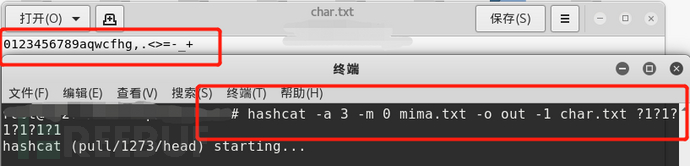
(1) If the password length is 8 digits and each bit consists of 0123456789aqwcfhj,.<>=-_+, you can use the following commands:
 You can also write these characters as a file, such as char.txt, using the following command.
 (2) If the password length is 8 digits, the first, third, and sixth digits are in "43545yt", the second and fourth digits are in "345dfv-=_+", the fifth and seventh digits are in "9vjnbbf-brg", and the eighth digit is in "345fkfggh", you can use the following commands:
 Of course, you can also write these characters into different files, for example char1.txt、........., use the following command.
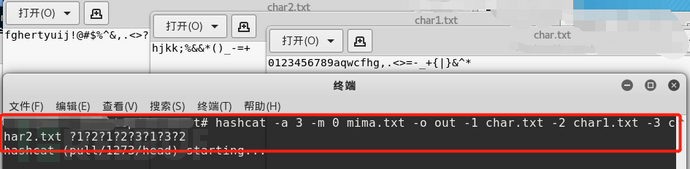 Note: Some symbols have special meanings on the command line, so when there are special symbols in the character set, it is best to write these symbols as files.
(3) On the basis of (2), increase the minimum length and maximum length, such as 4-8 bits. You can use the following commands.

Third, the use of some parameters
In the previous article, we introduced the use of some parameters, and today, we will move on to some of the commonly used parameters. Today we will focus on the screen display parameters
In the previous article, we introduced the file output command (-o/--outfile-format), which can be used to output the hashcat password decipher to a file in a certain format. But while hashcat is running, we can't see which passwords hashcat has deciphered. If we can directly print the password deciphered by hashcat to the screen in HashCat work, it will be more intuitive and convenient. There are exactly a few parameters in hashcat that can output the hashcat running result to the screen.
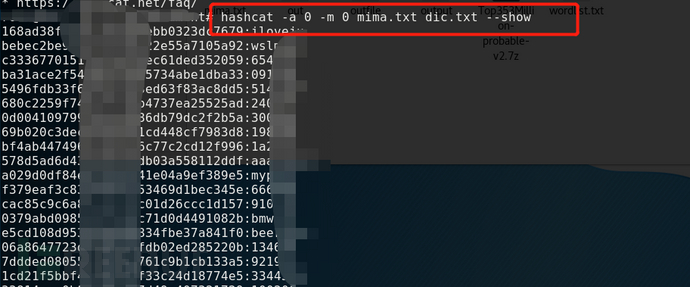
1、 --show
The show command will output the deciphered hash and password cached in the pot file to the screen window.
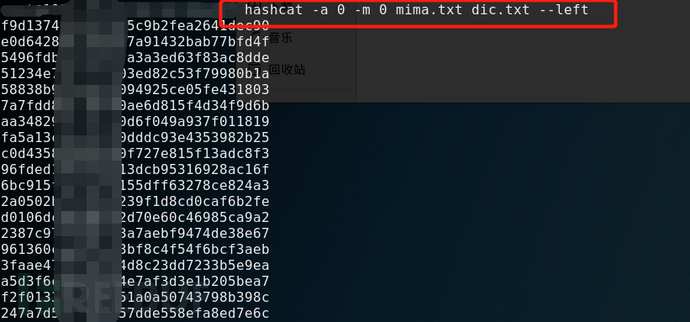
2、--left
The left command will output the hash value of the hashcat undeciphered to the screen
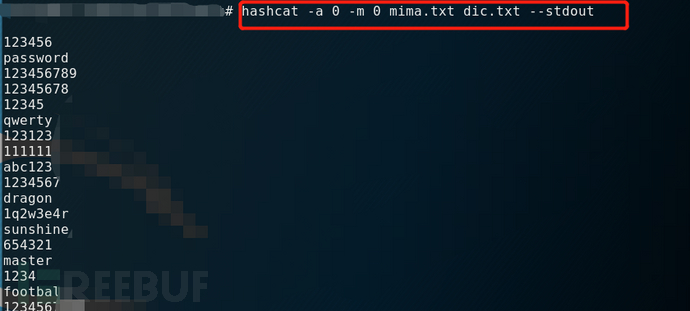
3、--stdout
The stdout command does not code-break, but it prints the contents of the dictionary used for code-breaking.
Fourth, summary
If you want to give full play to the function and role of hashcat, it is recommended that you try more with different commands, so as to be familiar with the combination of different hashcat commands. For the hashcat parameter, you can refer to the hashcat online help (-h).